Smart Templates
Ready-made parametric designs you add to a project and change with their own settings, and guided templates for printed products. Pro.Use this when: you want a ready-made design, such as a box, holder or hinge, that you can resize or change without modelling it from scratch.
Don't use this for: building a part from nothing or generating one with AI. Read Modelling and Spark (Womp AI).
A Smart Template is a ready-made design made in Womp that keeps its settings. You change it with those settings instead of rebuilding it. The Smart Templates library is part of Pro. See Credits and plans.
Find a Smart Template
- In a project: press
Oto open the objects menu and choose theSmart templatesfilter. TheSmart templatesrow is marked Pro. Click+on a template to add it to your scene. - On Discover: open Smart Templates from the left menu, or scroll to the
Smart Templatessection on the Discover page ("Start from a template and dial in the details"). Click a card to preview it.
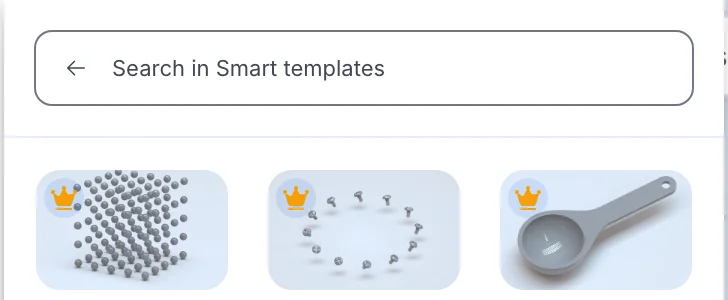
The Smart templates filter of the objects menu. The crown marks Pro templates. The list depends on what Womp has published.
Remix it from Discover
In the preview, click Remix this script. Womp makes a new project from the template and opens it. Without Pro, the button says Get Pro to remix this script.
Change it
Select the template object. The inspector shows its settings: "Internal items can be controlled using these properties." Each template has its own settings, so the controls differ from one template to the next.
Bake it
To edit the template with all the normal tools, bake it:
- Select the template object.
- Open
Functionsin the left toolbar and chooseConversion(marked experimental). - Click
Bake. Womp adds a copy made of regular objects. This needs a Pro project.
The baked copy has no template settings.
Templates for printed products
Some templates make a finished product that Womp prints and ships, such as a keycap or a keychain. These open in a step-by-step window instead of a project: Upload, Processing, Customize, Purchase and Summary.
Print it
A template is a starting point. When you change its settings, check the result against Design rules before you order. See Ordering a print.
Use instead
- Wrong move: modelling a common part, such as a box or hinge, from scratch. Why: a Smart Template may already do it with settings you can change. Right move: look in the
Smart templatesfilter of the objects menu first. - Wrong move: baking before you finish changing the settings. Why: the baked copy has no template settings. Right move: set the template first, then bake.
- Wrong move: printing a template after big setting changes without a check. Why: new sizes can make walls or gaps too thin. Right move: check it against Design rules.
Last checked: 2026-11-10. Womp version: Womp web app, November 2026.