Docs
Get started
Make
Print
Credits and plans
Agents and developers
Account and help
Changelog
Account and help
Signing in, account settings, deleting an account, and where to get help.Use this when: you need to change account settings, delete an account, or contact Womp.
Don't use this for: plans and billing. Read Credits and plans.
Account settings
Open your avatar menu. It has Credits, My orders, Saved addresses, Settings, Workspace:, Manage subscription (Manage team inside a team; free accounts see Try Pro for Free or Get Womp Pro), Theme and Log out. Settings has Profile, My orders, Saved addresses, Message preferences, Preferences, Password (email accounts only) and Delete account.
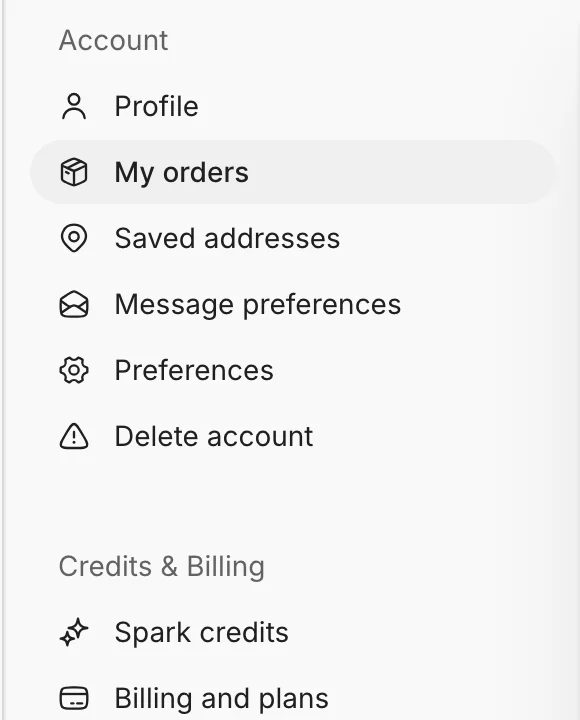
The settings menu. Delete account is the last item under Account.
Delete your account
- In settings, choose
Delete account. - Womp asks "Delete account?" and warns that this permanently deletes your projects, published work, likes, comments and any remaining credit. It cannot be undone.
- Type your account email to confirm, then click
Delete account.
Get help
- Quick answers: FAQ.
- Support: email support@womp.com. For a refund, write within 72 hours of the payment.
- Community currency: Womples.
Use instead
- Wrong move: deleting an account to stop a subscription. Why: deleting also removes every project and credit. Right move: cancel the plan in
Manage subscription. See Credits and plans.
Last checked: 2026-11-09. Womp version: Womp web app, November 2026.