Get started
What Womp is, how to sign up, and the parts of the editor you use first.Use this when: you or someone you help is new to Womp.
Don't use this for: detailed modelling, AI or printing steps. Read Make or Print.
Womp is a 3D modeling app that runs in your web browser. You can model with shapes that blend like clay, generate images and 3D models with Spark (Womp AI), connect steps in Flow (Nodes), and order a print of what you make. There is nothing to install. A mouse or trackpad works best.
Sign up
Go to beta.womp.com and choose Create your account. You can sign up with:
- Email and password. Womp sends a 6-digit code to verify your email (
Email verification). - Google:
Continue with Google. - Single sign-on:
Use single sign-on (SSO)for organisations that use it.
Find your way around
The left menu has Home, Projects, Spark (Womp AI), Discover (Showcase, Community, Events, Hire creators, Chats), Library, Assets (Smart Templates, Assets, Materials) and Order Prints. Click Discover or Assets to open its menu.
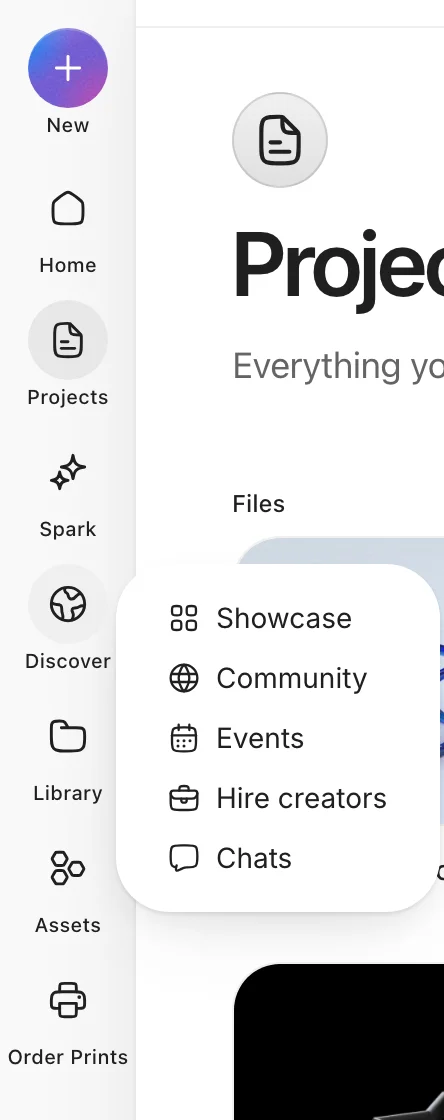
The left menu, with the Discover menu open.
Inside a project, switch views with the buttons Flow, Split and 3D Stage. See Modelling for the editor itself.
What you can make
- Models: shapes, curves and text that you combine and blend. See Modelling.
- AI generations: images, 3D models and parametric parts. See Spark (Womp AI).
- Exports: 3D files (OBJ, STL, PLY, GLTF, GLB, USD, FBX, DAE, X3D), images (PNG, JPG) and video (MP4, WebM, animated PNG).
- Prints: a physical object shipped to you. See Print.
Use instead
- Wrong move: looking for a download or an offline version. Why: Womp runs in the browser on cloud servers. Right move: open beta.womp.com.
- Wrong move: starting from an empty scene when you have a clear idea. Why: Spark can build a first version for you. Right move: describe it to Spark (Womp AI), then edit the result.
Last checked: 2026-11-09. Womp version: Womp web app, November 2026.