How Womp builds a model
Womp models are solids combined in order, blended with Goop, inside Areas. Knowing this tells you why a join looks soft, sharp or wrong.Use this when: you plan a model, or a join, cut or blend does not look the way you expect.
Don't use this for: step-by-step clicks. Read Shapes and Goop, Scene list, and Form and Mirror.
Solids, combined in order
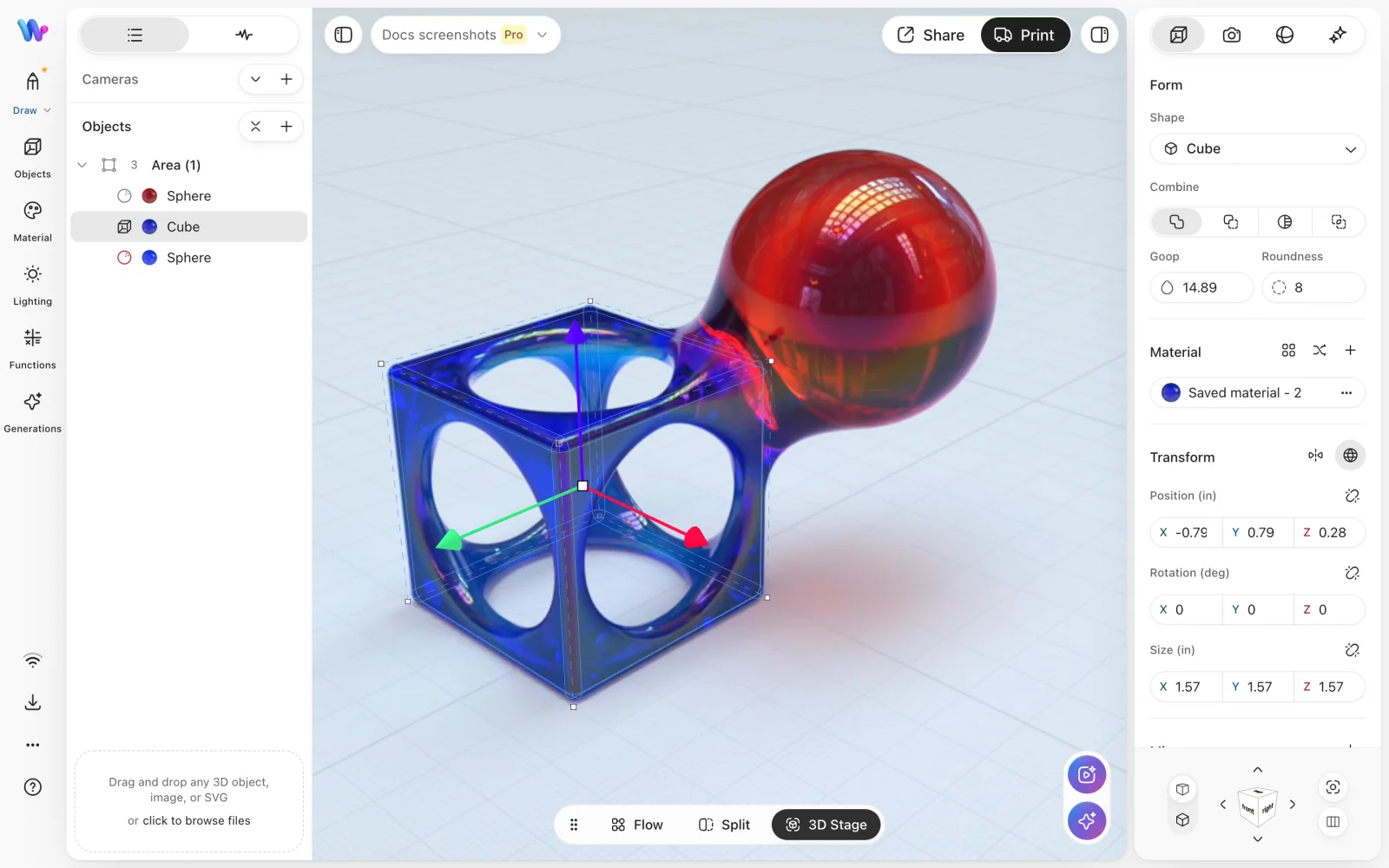
One Area holding a sphere, a cube and a second sphere, in that order. The second sphere is Negative, so it cuts the hollows out of the cube above it. The cube's Goop blends it into the first sphere where they meet.
Every Womp shape is a solid defined by a distance field: for any point in space, how far that point is from the shape's surface. A model is these solids combined, which is called constructive solid geometry.
The scene list is the order. Each object acts on what was built before it in its Area:
Positiveadds the shape.Negativecuts the shape away.Intersectkeeps only where shapes overlap.Stainpaints material onto what is already there.
Cutting is as useful as adding. Grooves, panel lines, eyelets, recesses, undercuts and sharp edges all come from cuts. See Form and Mirror.
Goop is a blend between solids
Goop blends two solids smoothly where they meet. You set it per object.
- None: a hard crease where the shapes meet.
- A little: a crisp seam with a soft fillet.
- A lot: the shapes flow into one form.
Goop also works on cuts: a gooped Negative leaves a soft, rounded hollow instead of a sharp rim.
The right amount depends on the size of the part. Too much and small parts dissolve, rims swell and nearby edges sag. Too little and parts look like stacked plates with hard edges. Judge it close up.
Areas decide what can blend
- Goop only reaches objects in the same
Area, and only against what was built before that object in theArea. - Objects in different Areas never blend. Where they overlap you see a raw intersection.
- A union's Goop affects only its outer join with the rest of the
Area. - A panel, fold or strap that should flow into a body belongs in the body's
Area.
Colour follows the same rule. Inside one Area, a gooped join mixes the two materials across the blend. Separate Areas keep a clean colour edge, but cannot blend.
Each Area has one resolution, shared by everything in it. If an Area shows stepped edges, faceted curves or blurred small features, check its resolution in the Health tab. See Scene list.
More than shapes
On top of combined solids, Womp has:
- Curves: a profile swept along a path, for limbs, straps, tubes and piping. See Curves and drawing.
- Mirror: reflects an object, with its own
Goopwhere the halves meet. - Text: raised or cut lettering.
Look, then adjust
After each change, look at the join close up. Then change the Goop, the cut or the Area's resolution, one at a time.
Use instead
- Wrong move: putting a strap and the body it wraps in different Areas, then adding Goop. Why: objects in different Areas never blend. Right move: move the strap into the body's
Area. - Wrong move: adding more Goop everywhere to smooth a model. Why: too much dissolves small parts and swells rims. Right move: goop each join to suit its size, and check it close up.
- Wrong move: building a groove by adding thin walls around it. Why: cuts make cleaner, sharper detail. Right move: cut the groove with a
Negativeshape.
Last checked: 2026-11-10. Womp version: Womp web app, November 2026.